
Pocketbase



I recently got around to trying PocketBase and wanted to share my thoughts and the challenges I faced.
My first impression is really positive: PocketBase offers a solid, lightweight backend basis for quickly starting an app; it perfectly fits small projects where you just want to start building without having to set up a lot of framework stuff first.
After launching, the basics are already set up:
- A user table
- Authentication via password / OAuth / OTP / MFA
- Mail templates for authentication-related things like email verification or OTP emails
- Database with an admin panel and migrations
All this can be configured further in the admin dashboard.
Of course, all of this refers to the backend so far. You still need to build the login and registration pages yourself, though the API is ready to use immediately.
Dev candy
Creating new tables
Adding new tables to the database is very easy using the web UI:
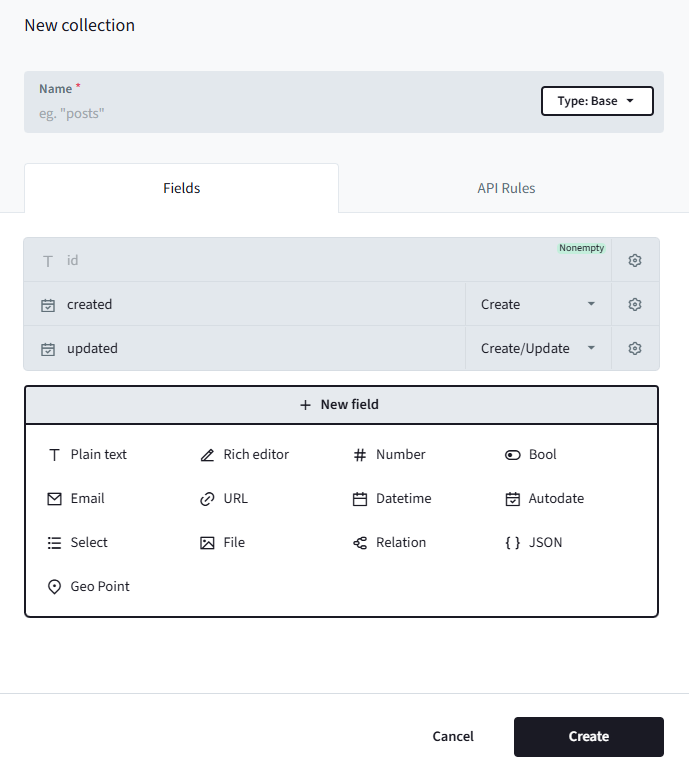
After hitting "Create," the table is persisted and a migration file is automatically generated in the project folder.
Each collection has its own set of API Rules that lets you filter who has access to the records. So, "authenticated users can only see their own records" is just as easy as typing user.id = @request.auth.id.
Modifying Records
The dashboard gives you full control over the records, which helps a lot during development. There is no need to install a separate database tool like Beekeeper Studio, pgAdmin, or phpMyAdmin.
API Docs
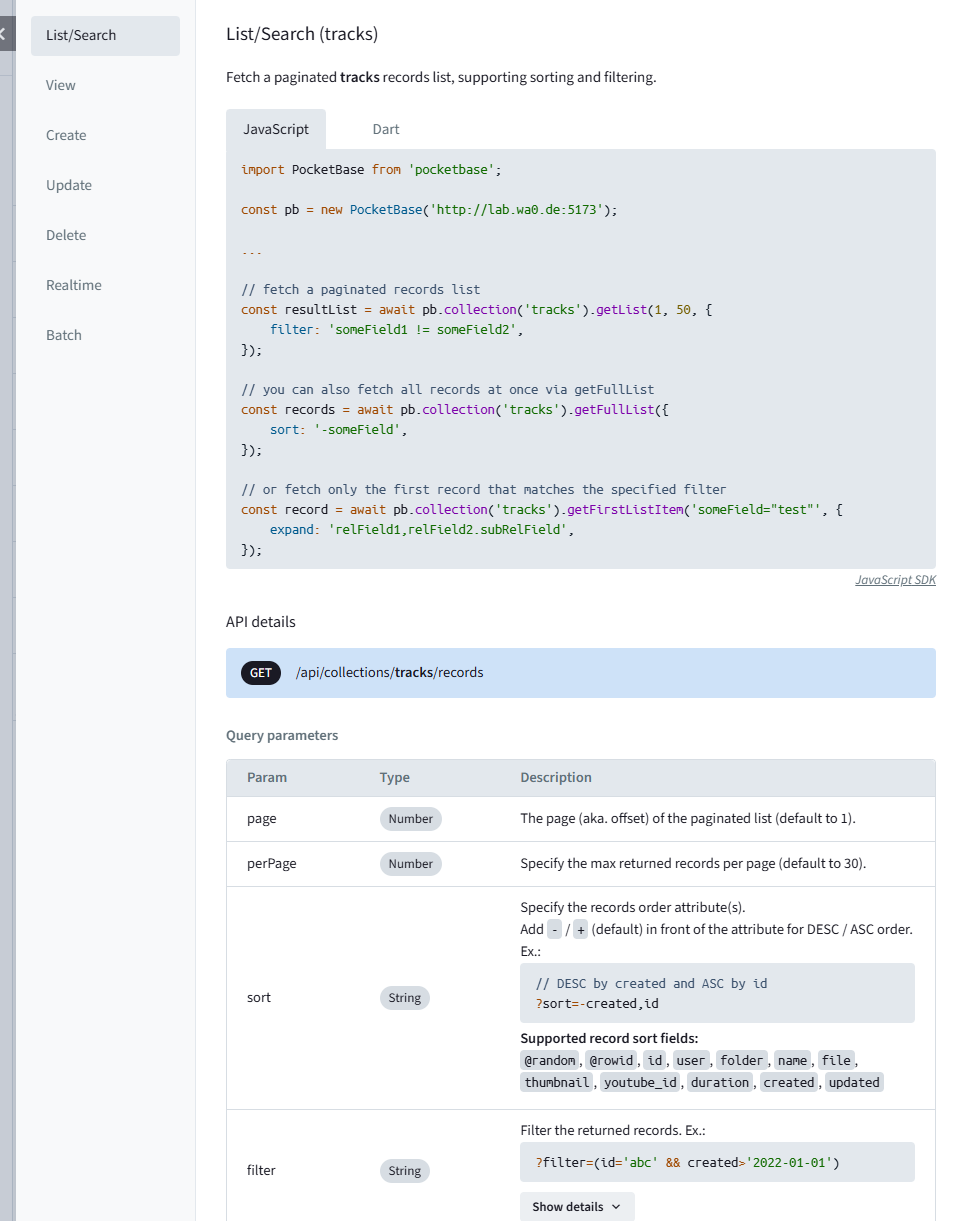
While there is no OpenAPI / Swagger docs there are extensive API examples available in the dashboard for the official js-sdk
Logs
Each request is logged to the filterable dashboard log, which allows debugging custom hooks, response times, and API rules.
File Storage
PocketBase automatically handles file uploads for you; you can focus on writing the frontend and not worry about handling the server-side logic. There is also automatic server-side thumbnail creation for images!
Live Syncing
This is an awesome feature for building Vue-based apps that stay in sync without constantly re-fetching data.
Normally, when building an API-based SPA, you need to ensure your state stays up-to-date (e.g., removing items from a list after a delete request finishes, or adding them after a create request). With realtime events, the server sends an event whenever something changes; I'll cover that in more detail later.
You can also use this to send custom events - it's not limited to database records.
Hooks
While PocketBase itself is written in Go, you can write custom hooks in JavaScript to define custom API routes or hook into events. This was the first thing that didn't feel as polished to me yet.
The JS files you write are executed by an ECMAScript implementation written in Go called Goja. It behaves slightly differently than Node.js in some ways, which is expected since it's a completely different runtime; therefore, there is no access to runtime-specific features (like Node.js basics such as "fs" or "crypto"). You are forced to work with the globally injected tools instead.
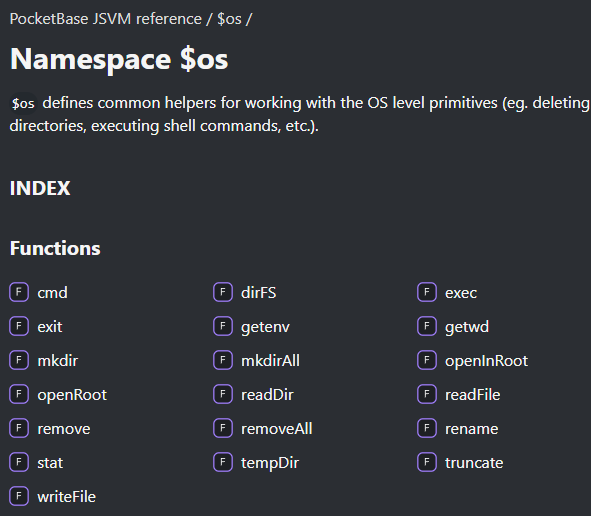
Currently, only CommonJS (CJS) modules are supported; ESM modules require precompilation using a bundler.
Each hook function is serialized and executed in its own isolated context.
const name = "test"

onBootstrap((e) => {
    e.next()

    console.log(name) // <-- name will be undefined inside the handler
})
I had a hard time debugging server-side hook issues because objects only log as [object Object], which led me to use JSON.stringify constantly, and errors aren't logged at all (or only without a proper stack trace).
So, if you need extensive custom server logic in addition to what PocketBase offers by itself, I would suggest going the Go route. This skips the Goja troubles and (in my opinion) feels much better integrated with proper "embedded" access to Go libraries. Note that Goja is still used for migrations, but that's not a big deal since they are auto-generated for the most part anyway.
For my test project, I only needed one custom route. Since I've never written Go code before, I chose to use a JS hook this time.
Bring your own Docker
There is no official Docker image available, but there is an example Dockerfile:
FROM alpine:latest

ARG PB_VERSION=0.36.5

RUN apk add --no-cache \
    unzip \
    ca-certificates

# download and unzip PocketBase
ADD https://github.com/pocketbase/pocketbase/releases/download/v${PB_VERSION}/pocketbase_${PB_VERSION}_linux_amd64.zip /tmp/pb.zip
RUN unzip /tmp/pb.zip -d /pb/

# uncomment to copy the local pb_migrations dir into the image
# COPY ./pb_migrations /pb/pb_migrations

# uncomment to copy the local pb_hooks dir into the image
# COPY ./pb_hooks /pb/pb_hooks

EXPOSE 8080

# start PocketBase
CMD ["/pb/pocketbase", "serve", "--http=0.0.0.0:8080"]
This example assumes you will use it exactly as-is; however, if you plan to integrate Go code, you may need to modify certain parts of the Dockerfile.
Other Challenges
Prefilling the current user on create
The dashboard does not offer a way to configure this
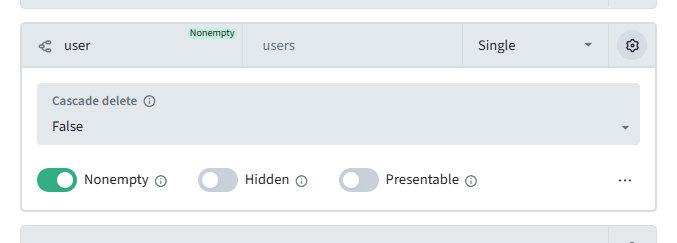
It is possible to achieve this using a hook though:
onRecordCreateRequest((e) => {
    if (!e.auth.isSuperuser()) e.record.set("user", e.auth.id)
    e.next()
}, "folders", "tracks")
The "if superuser" check is necessary; otherwise, you won't be able to create records via the Admin Dashboard. The userId field would end up populated with a SuperUser ID (since SuperUsers and regular Users exist in separate tables).
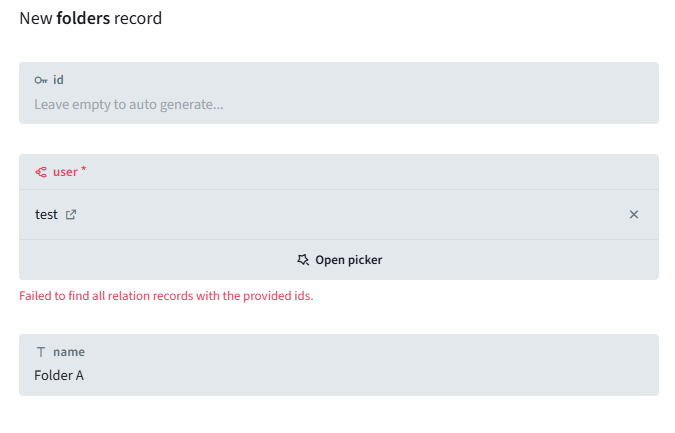
What's a bit tricky here is that you can't define a proper create rule (as shown in the screenshot below) because the request doesn't include a user by design - the client shouldn't be dictating which user gets the entry. And the hook overwrites it anyway.

You can use either this rule or the hook, but not both at the same time. For now, I've chosen to use the hook because it keeps the frontend code cleaner.
Auto unsubscribe
Pocketbase offers realtime subscriptions to collection changes. You can subscribe to all track changes like this:
//FolderView.vue

onMounted(() => {
    pb.collection("tracks").subscribe("*", e => {
        ....
    });
});
Internally, the JS SDK only subscribes to the tracks once, even if you subscribe to track changes in different parts of your app. However, this means that if you call unsubscribe inside onUnmounted, it kills the subscription for all other places in the app listening for those changes. It is important to only unsubscribe from the specific listener; luckily, the subscribe method returns an unsubscribe callback for this purpose.
I created a little composable:
export function useSubscription(name, filter, cb) {
    let unsubscribe;

    onMounted(async () => {
        unsubscribe = await pb.collection(name).subscribe(filter, cb);
    });

    onUnmounted(async () => {
        if (unsubscribe) await unsubscribe();
    });
}
Realtime sync of filtered collections
Let's say we want a live list of all tracks in a folder.
It is possible to subscribe with a filter:
await pb.collection("tracks").subscribe("*", e => {

}, {
   filter: "folder  = null"
});

//created subscription:
subscriptions: ["tracks/*?options=%7B%22query%22%3A%7B%22filter%22%3A%22folder%20%3D%20null%22%7D%7D",…]
The issue is that if a track changes and no longer matches this filter (because the folder of the track changed), the subscription isn't triggered, so I don't receive an update or delete event.
My current solution is to listen to the entire collection and check if the change matters:
export function useFilteredCollection(name, filter, checkFilter) {
    const coll = ref([])

    //immediately fetch, also re-fetch if the filter changes
    watchEffect(async () => {
        try {
            coll.value = await pb.collection(name).getFullList({
                filter: toValue(filter)
            });
        } catch (error) {
            if (error.isAbort) return;
            console.error(error);
        }
    });

    useSubscription(name, "*", e => {
        const matchesFilter = checkFilter(e.record);

        if (e.action === "create" && matchesFilter) {
            //a new record has been created that matches the filter
            coll.value.push(e.record);
        } else if (e.action === "delete" && matchesFilter) {
            //a record has been deleted that matches the filter
            const idx = coll.value.findIndex(t => t.id === e.record.id);
            if (idx !== -1) coll.value.splice(idx, 1);
        } else if (e.action === "update") {
            const idx = coll.value.findIndex(t => t.id === e.record.id);

            if (idx !== -1) {
                if (!matchesFilter) {
                    // a record that matched the filter no longer matches it, remove
                    coll.value.splice(idx, 1);
                } else {
                    // a record that still matches the filter was updated
                    coll.value[idx] = e.record;
                }
            } else if (matchesFilter) {
                // Existing record has been updated and now matches the filter
                coll.value.push(e.record);
            }
        }
    });

    return coll;
}


const tracks = useFilteredCollection(
    "tracks",
    () => folder.value ? pb.filter("folder = {:folder}", {
        folder: folder.value.id
    }) : null,
    rec => rec.folder === folder.value?.id
);
Conclusion
PocketBase is an awesome tool for rapid prototyping; it lets me focus on writing the part the user actually interacts with and integrates very well with Vue.js.
It's not a silver bullet for all projects though. If the backend needs to be more than just CRUD REST Controllers, you have to either fumble your way through the weird JS runtime, write the backend in Go, or use a different framework.