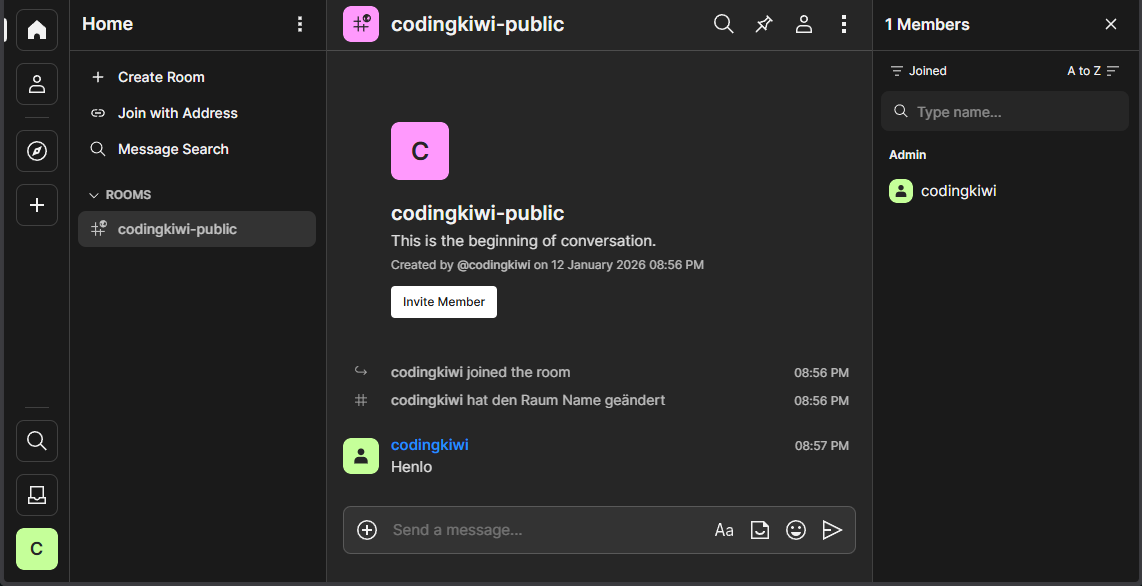
Setting up a matrix server


I was curious and wanted to try setting up a Matrix server again. I'd already attempted it a few years back, using Synapse as the server and Element as the client.
My conclusion then was that it was a bit annoying to set up, and the client’s usability and look and feel just weren't quite there yet. It felt like a chat - just a chat - something you only use if you absolutely have to.
So, I decided to give it another try today.
The Server
There are multiple options: https://matrix.org/ecosystem/servers/
Synapse
While synapse, the server I used the last time, is still the stable standard / reference server, I chose to look at other options because it was a bit annoying to set up and quite resource intensive.
Looking at the docker compose demo from element-hq already is enough for me:
- two synapse containers for generating secrets?
- the main synapse container
- a synapse worker
- a synapse federation sender
- a matrix authentication service
- two livekit containers (idk what they do, TURN/STUN?)
- two element containers (web and calls)
This is for sure a quite optimal setup which will be able to handle lots of users but it feels incredibly overkill for my little test.
continuwuity
Written in Rust with a very small footprint, already labeled as stable.
The original Conduit project was archived, so the community forked it into Continuity and Tuwunel. One is maintained by 100% volunteer work, and the other has a full-time, paid developer.
There’s been some weird discussion happening there, though... Honestly, so much community drama is pretty exhausting. It feels like I could end up choosing the “wrong” fork, only to have it abandoned a few months later because some folks argue about something.
Also.. the name contains "uwu" .. so.. nope. F***ing Weebs /s
Dendrite
It aims to use fewer resources and be a good fit for small homeservers.
There are a few things to keep in mind, though:
- It used to be maintained by matrix-org (https://github.com/matrix-org/dendrite), but now it's being maintained by element-hq (https://github.com/element-hq/dendrite). The Matrix Foundation no longer allocates resources to it; Element maintains it on a best-effort basis.
- It’s now in "maintenance mode," which means there will be ongoing security and compatibility updates, but no long-term feature updates (for now, until there is more funding or more maintainers)
This is based on this blog post where they explain issues with funding.
we’ve had no choice but pause development on the majority of the core team’s next-generation Matrix projects [...] this may also cause a slow-down in Dendrite development, although Dendrite itself will still be maintained.
Free, encrypted communication is fundamental to individual freedom and to democracy itself. With that in mind, I made a donation and chose Dendrite.

Docker Setup
The install instructions are quite straight forward

I want to use docker, luckily there is an example docker-compose.yaml prepared here too:
 element-hq
And compared to synapse it is just one container 😄
To get started I generate the private key and config:
docker run --rm --entrypoint="/usr/bin/generate-keys" -v $(pwd)/config:/mnt matrixdotorg/dendrite-monolith:latest -private-key /mnt/matrix_key.pem

docker run --rm --entrypoint="/bin/sh" -v $(pwd)/config:/mnt matrixdotorg/dendrite-monolith:latest -c "/usr/bin/generate-config -dir /var/dendrite/ -db postgres://dendrite:itsasecret@postgres/dendrite?sslmode=disable -server chat.example.com > /mnt/dendrite.yaml"
But we need a reverse proxy, let's just use nginx and copy the original config so we can modify it:
docker run --rm --entrypoint=cat nginx:1.29-trixie /etc/nginx/nginx.conf > nginx.confMore specifically, add the necessary .well-known endpoints and proxy from /_matrix to the dendrite instance
 element-hq
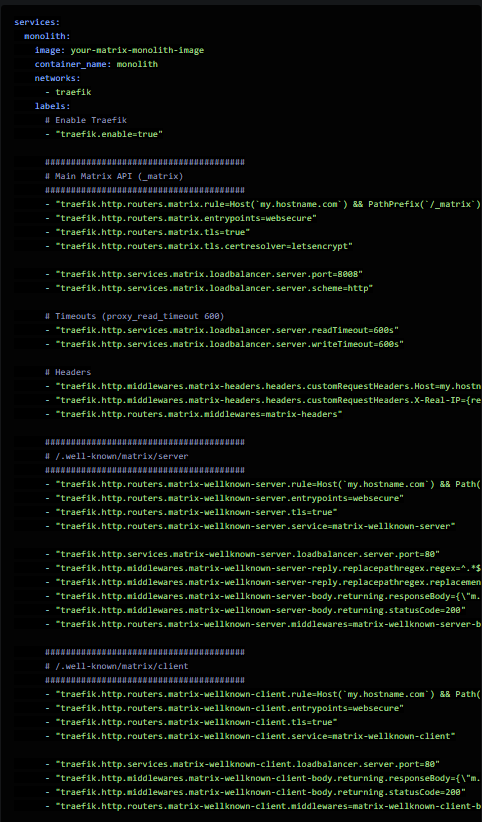
In my local test setup, I already use traefik, so I added the Traefik labels to automatically configure SSL.
You might ask: Why set up a reverse proxy behind a reverse proxy? And that's an excellent question - I won't go into too much detail.
I like to configure Traefik stuff with Docker labels to avoid juggling with config files or, more importantly, have the services and their config "self-contained"
And yes, it would be possible to achieve the three endpoints + ssl via labels added to the monolith, but that would look like this:
Client
You can use any client you want with matrix. As with the servers there are many options: https://matrix.org/ecosystem/clients/
Since we already have the nginx container running we can simply use it to serve a matrix web client like element web or cinny.
Cinny is available as a simple archive:
# Download release
wget https://github.com/cinnyapp/cinny/releases/download/v4.10.2/cinny-v4.10.2.tar.gz

# Extract, remove archive
tar -xf cinny-v4.10.2.tar.gz && rm cinny-v4.10.2.tar.gz
So let's just add it to nginx:
      location / {
          root /opt/cinny/dist/;

          rewrite ^/config.json$ /config.json break;
          rewrite ^/manifest.json$ /manifest.json break;

          rewrite ^/sw.js$ /sw.js break;
          rewrite ^/pdf.worker.min.js$ /pdf.worker.min.js break;

          rewrite ^/public/(.*)$ /public/$1 break;
          rewrite ^/assets/(.*)$ /assets/$1 break;

          rewrite ^(.+)$ /index.html break;
      }
You can also modify the config.json in the cinny/dist folder to set the default homeserver url in the input field to be your domain.
My final docker-compose.yaml looks like this
services:
  postgres:
    hostname: postgres
    image: postgres:15-alpine
    restart: always
    volumes:
      - ./data/postgres:/var/lib/postgresql/data
    environment:
      POSTGRES_PASSWORD: supersecret
      POSTGRES_USER: dendrite
      POSTGRES_DATABASE: dendrite
    healthcheck:
      test: ["CMD-SHELL", "pg_isready -U dendrite"]
      interval: 5s
      timeout: 5s
      retries: 5
    networks:
      - matrix

  monolith:
    hostname: monolith
    image: ghcr.io/element-hq/dendrite-monolith:latest
    restart: unless-stopped
    volumes:
      - ./config/dendrite.yaml:/etc/dendrite/dendrite.yaml:ro
      - ./config/matrix_key.pem:/etc/dendrite/matrix_key.pem:ro
      - ./data/media:/var/dendrite/media
      - ./data/jetstream:/var/dendrite/jetstream
      - ./data/search:/var/dendrite/searchindex
    depends_on:
      postgres:
        condition: service_healthy
    networks:
      - matrix

  nginx:
    image: nginx:1.29-alpine
    restart: unless-stopped
    volumes:
      - ./config/nginx.conf:/etc/nginx/nginx.conf:ro
      - ./cinny:/opt/cinny:ro
    depends_on:
      - monolith
    networks:
      - matrix

networks:
  matrix:
    name: matrix
    attachable: true
Creating the admin account
There are two ways to register new users in dendrite:
Enabling registration
This means everyone can create their own accounts on the dendrite server using whatever Matrix client they use. I don't like that - someone could create lots of users, filling my database, or cause a lot of federation traffic. You can make it a bit harder by configuring reCAPTCHA, but yeah.
Shared secret registrations
This requires setting a shared secret in the config. After that you can create new users using the CLI tool:
docker compose exec monolith /usr/bin/create-account -username codingkiwi -adminBut why a shared secret when the user is added right on the server via the CLI?
The shared secret registration just enables the “official” /_synapse/admin/v1/register endpoint - it's intended to be used by external identity management software, for example. The CLI tool just uses that endpoint under the hood.
A quick test on https://federationtester.matrix.org/ says we are up and running!
TURN Server
It is suggested to add a TURN server like coturn which helps for achieving reliable voice/video calling across NATs or firewalls. Since I only want to chat for now I will check this out later.
Happy chatting!